How I Built My Developer Portfolio with Vite, React, and Bun — Fast, Modern & Fully Customizable
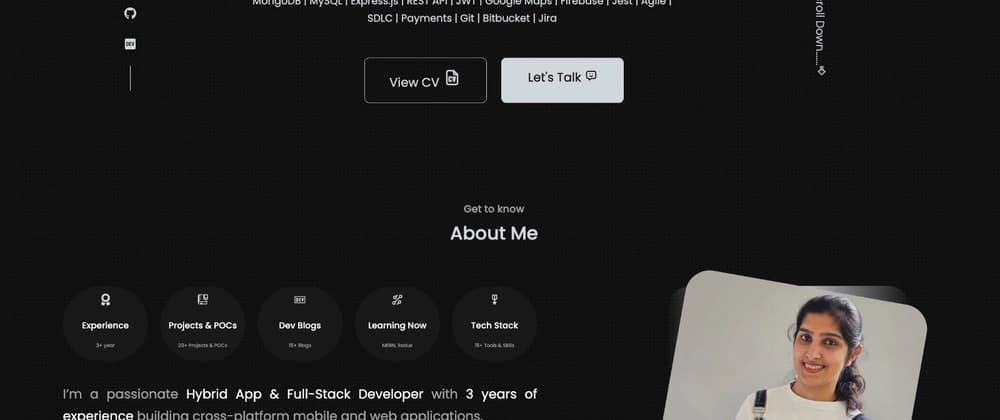
A lightweight, modular portfolio built with Vite + React + TypeScript + Bun, designed to showcase projects, blogs, and achievements — built from scratch with simplicity and speed in mind.
Why I Built It
As developers, our portfolios are often the first impression we make — so I wanted mine to be clean, fast, and easy to maintain.
I experimented with several static site tools before finding the perfect trio: Vite, React, and Bun. This stack offered everything I wanted — modern development, instant reloads, and a minimal setup that just works.
👉 Live Demo: https://dainyjose.github.io/my-portfolio/
👉 Source Code: https://github.com/dainyjose/my-portfolio
| Tool | Purpose |
|---|---|
| Vite | Lightning-fast build tool with instant HMR |
| React + TypeScript | Component-based architecture with type safety |
| Bun | Fast JavaScript runtime & package manager |
| CSS Modules | Clean and scoped component styling |
| GitHub Pages | Simple and free static site hosting |
Setting Up the Project
Vite and Bun make setting up a React + TypeScript project almost instant.
bash# Create a new Vite + React + TypeScript project bun create vite my-portfolio --template react-ts cd my-portfolio # Install dependencies (super fast!) bun install # Start the dev server bun run dev
Within seconds, the project is live with hot reload and TypeScript support.
Project Structure
Here’s how I organized my portfolio for clarity and scalability:
bashmy-portfolio/ ┣ src/ ┃ ┣ components/ ┃ ┣ pages/ ┃ ┣ data/ ┃ ┣ assets/ ┃ ┗ App.tsx ┣ public/ ┣ index.html ┣ vite.config.ts ┗ bun.lockb
Highlights:
-
components/→ Reusable UI elements (Header, Footer, ProjectCard, etc.) -
pages/→ Sections like Home, About, Projects, and Contact -
data/→ Static project data and links -
assets/→ Images and icons
Designing the UI
I went for a simple, professional design — no UI frameworks or heavy styling libraries, just clean CSS Modules for scoped styles.
bash// src/components/Header.tsx import styles from "./header.css"; export const Header = () => ( <header className={styles.header}> <h1 className={styles.title}>Dainy Jose</h1> <nav className={styles.nav}> <a href="#projects">Projects</a> <a href="#contact">Contact</a> </nav> </header> );
bash/* src/components/header.css */ .header { display: flex; justify-content: space-between; align-items: center; padding: 1rem 2rem; background-color: #ffffff; border-bottom: 1px solid #eaeaea; } .title { font-size: 1.6rem; font-weight: 600; color: #222; } .nav a { margin-left: 1rem; text-decoration: none; color: #007bff; transition: color 0.2s; } .nav a:hover { color: #0056b3; }
This gives full control over the look while keeping the CSS lightweight and maintainable.
Adding Projects & Blogs
To make it easy to update, I store all portfolio items in a single data/projects.ts file:
bash// src/data/projects.ts export const projects = [ { name: "My Resume App", description: "Created using React + Vite.", link: "https://dainyjose.github.io/my-resume/", }, ];
And render them dynamically:
bash// src/components/Projects.tsx import { projects } from "../data/projects"; export const Projects = () => ( <section id="projects"> <h2>Projects</h2> {projects.map((p) => ( <a key={p.name} href={p.link} target="_blank" rel="noopener noreferrer"> <h3>{p.name}</h3> <p>{p.description}</p> </a> ))} </section> );
This makes adding new projects as easy as editing one file.
Optimizing for Performance
To keep the site fast:
-
Compressed images manually before adding to
assets/ -
Leveraged Vite’s built-in minification and bundling
-
Bun handled builds incredibly fast
Every rebuild or deploy took only a few seconds.
Deployment
I hosted the portfolio on GitHub Pages using a simple build + deploy command:
bash"scripts": { "dev": "vite", "build": "vite build", "preview": "vite preview", "deploy": "gh-pages -d dist" }
Then deployed with:
bashbun run build bun run deploy
In just a few seconds, the site was live: ➡️ https://dainyjose.github.io/my-portfolio
Lessons Learned
-
Bun + Vite make development effortless
- The build and dev speed is unbeatable.
-
TypeScript ensures long-term scalability
- Strong typing helps maintain clean code.
-
CSS Modules keep styling simple and scoped
- Easy to maintain and modify as the portfolio grows.
-
GitHub Pages = quick deployment
- Perfect for personal projects and static sites.
What’s Next
I plan to enhance the portfolio with:
-
Dark mode toggle
-
GitHub API integration to auto-fetch repositories
-
Dev.to API integration for displaying latest blog posts
Final Thoughts
This project reminded me that simplicity is powerful. You don’t need complex tools or heavy UI frameworks to create something elegant and efficient.
If you’re building your portfolio, I highly recommend giving Vite + React + Bun a try — you’ll be surprised by how smooth the workflow is.